Desktop app
rupibooks for Windows and Mac
Your business's books in their own app, on your desktop. Same account, same books as on the web, with your sign-in remembered and updates installed for you.
What you get
- Its own window and Dock or taskbar icon, away from your browser tabs.
- Starts fast: the app keeps its code on your computer and downloads only what changed.
- Updates itself in the background. On Windows it downloads only the changed parts of each update.
- The same account and books as rupibooks on the web. Sign in on any device and carry on.
- Shows whether everything is synced. Offline, you can still look through the pages you've opened, and it syncs again the moment you're back online.
- Your books live safely in the cloud, so a lost laptop doesn't mean lost books.
The app is made for business owners. Accountants and bookkeepers work in the practice view on the web, with all their clients in one place.
Install on Windows
Windows 10 or 11, 64-bit
1.Download the installer
Click Download for Windows. The installer is one file, rupibooks-Setup.exe.
2.Open it
Windows may say it protected your PC, because rupibooks is a new app. Choose More info, then Run anyway. rupibooks installs for you in a few seconds; no administrator rights needed.
3.Sign in
Use your rupibooks email and password. You'll find rupibooks in the Start menu and on your desktop.
Install on a Mac
macOS 12 Monterey or later, Apple silicon or Intel
1.Download the app
Click Download for Mac and open the rupibooks .dmg file.
2.Drag it into Applications
Drag the rupibooks icon onto the Applications folder, then open rupibooks from Applications.
3.Allow it the first time
If your Mac says it can't check rupibooks, open System Settings, then Privacy & Security, scroll down and choose Open Anyway. You only do this once.
4.Sign in
Use your rupibooks email and password. Keep rupibooks in the Dock for one-click access.
rupibooks on your phone
Install rupibooks from your phone's browser today. It gets its own icon on your home screen and opens full-screen, like an app, with the same account and books.
Android (Chrome)
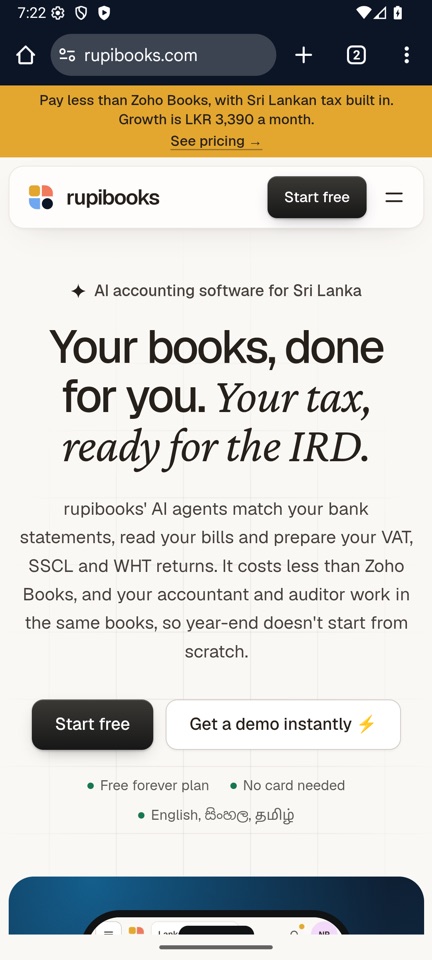
1.Open rupibooks.com in Chrome
Go to rupibooks.com and sign in, or start free.
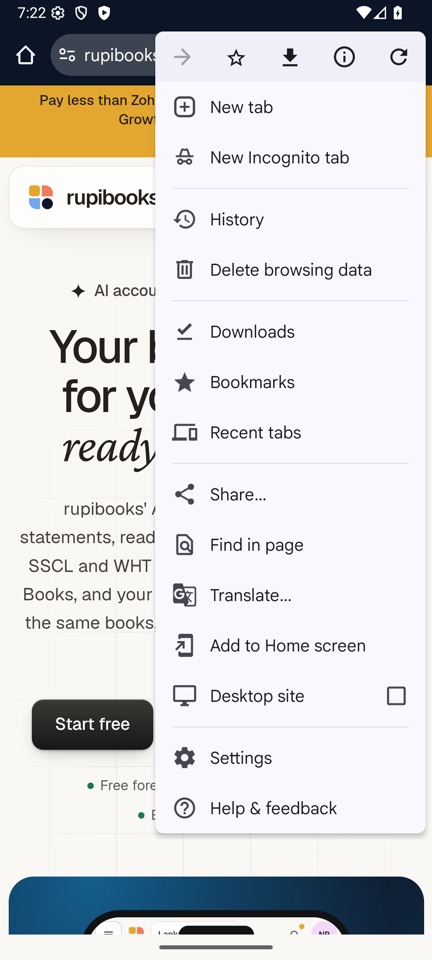
2.Tap ⋮, then Add to home screen
The menu is at the top right. On some phones it says Install app.
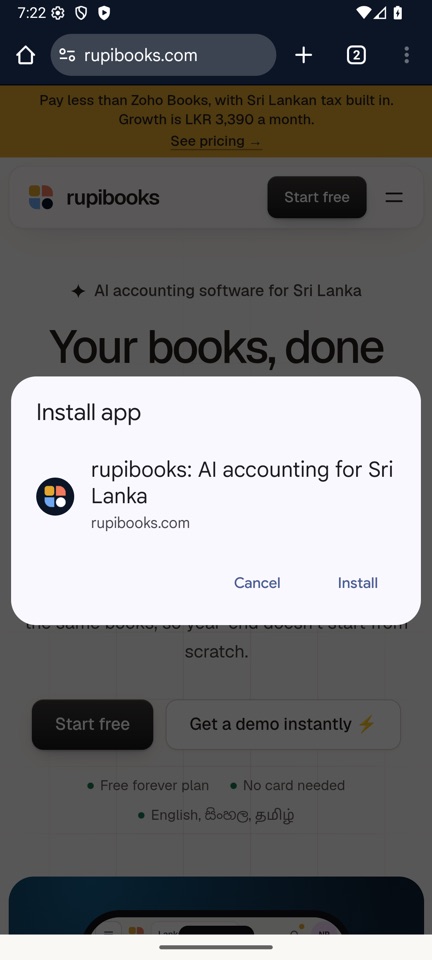
3.Tap Install
Confirm, and rupibooks is added to your home screen.
4.Open it from your home screen
rupibooks opens full-screen, without the browser bars.
iPhone (Safari)
1.Open rupibooks.com in Safari and tap Share
The Share button is a square with an arrow. On iOS 26, tap ••• first, then Share.
2.Tap Add to Home Screen
Scroll down the list if you don't see it straight away.
3.Keep Open as Web App on, then tap Add
The name and icon are filled in for you.
4.Open it from your home screen
rupibooks opens full-screen, like any other app.
Native Android and iPhone apps for business owners are coming soon.
Questions
Is the desktop app free?
Yes. The app is free to download and works with every plan, including Free. You pay only for your plan, as on the web.
Does it work without the internet?
Partly. Offline, you can look through the pages you've opened before, as they were when they last synced, and the app tells you you're offline. Saving changes needs a connection, because your accountant and your team work in the same books. As soon as you're back online, rupibooks syncs by itself.
Are my books stored on my computer?
Only a copy of the pages you've opened, so you can read them offline. Your books themselves live in rupibooks' cloud, so a lost laptop doesn't mean lost books. The copy is deleted when you sign out.
How do I know everything is synced?
The status at the top of the app says Synced when every change has reached rupibooks, Syncing while one is on its way, and Offline when there's no connection. Click it to sync straight away.
How do updates work?
rupibooks checks for updates in the background and installs them when you restart the app. On Windows it downloads only the parts that changed, so updates are small.
Can I use rupibooks on my phone?
Yes. Open rupibooks.com in Chrome on Android or Safari on iPhone and add it to your home screen, as shown above. It opens full-screen like an app. Native Android and iPhone apps are coming soon.
Is it the same as rupibooks on the web?
Yes. It's the same rupibooks workspace for business owners, in its own window. New features arrive in the app the moment they're on the web.
I'm an accountant. Should I use the app?
The desktop app is made for business owners. Accountants and bookkeepers use the practice view on the web, where all their clients are in one place.
Why does Windows or my Mac warn me the first time?
Both check new apps from new publishers. rupibooks is new, so they ask you to confirm once (More info, then Run anyway on Windows; Open Anyway in Privacy & Security on a Mac). After that it opens like any other app.
See how rupibooks fits your business
Start free in minutes, or get a demo instantly. It opens right away with sample books for a business like yours.